How to Redeem Throw a Seed Codes on PC, iPhone & Android
Step-by-step instructions to find the Settings Gear menu, paste working Throw a Seed codes on PC, Mac, iPhone, or Android, check OS support, and fix invalid-code errors.
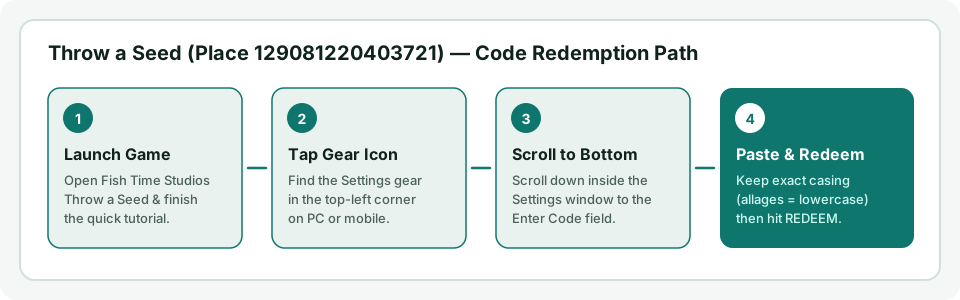
Quick Overview: Browser Viewing vs. In-Game Redemption
You can view and copy all 7 active Throw a Seed codes on throwaseedcodes.com directly inside any mobile or desktop web browser with no signup, no download, and no cost. To claim the rewards in-game, you paste those codes inside the official free Roblox app or desktop client for Throw a Seed by Fish Time Studios (Place 129081220403721).
How to Redeem Throw a Seed Codes on PC & Mac (Windows / macOS)
- Copy an active code first: Open our working Throw a Seed codes list in Chrome, Edge, Safari, or Firefox and click Copy on the code you want (for example,
allagesorRELEASE). - Launch the official game: Open Throw a Seed by Fish Time Studios (
roblox.com/games/129081220403721/) inside the Roblox desktop client. - Finish the short tutorial: Brand-new accounts must complete the quick opening throw sequence before code redemptions register cleanly.
- Open Settings (Gear icon): Click the Gear icon in the top-left corner of the game HUD.
- Scroll to the Codes box: Scroll all the way down to the bottom of the Settings popup until you see the Enter code input field.
- Paste and click REDEEM: Press
Ctrl+V(Windows) orCmd+V(macOS), click REDEEM, then tap Collect on the reward card.
How to Redeem Throw a Seed Codes on Mobile (iPhone, iPad & Android)
You do not need any third-party app to grab codes on mobile — keep throwaseedcodes.com open in Safari (iOS) or Chrome (Android) alongside the official Roblox app:
- Tap Copy in your mobile browser: Visit the Throw a Seed codes homepage and tap Copy on a card so autocorrect never adds typos or trailing spaces.
- Switch into Roblox: Launch Throw a Seed (
Place 129081220403721by Fish Time Studios) and finish the brief opening tutorial if it is your first session. - Tap the small Gear icon in the top-left corner: After the tutorial finishes, tap the Settings Gear button in the upper-left HUD.
- Swipe upward inside the Settings menu: On smaller phone screens, the code field sits below the audio/graphics toggles — drag upward inside the Settings panel until Enter code appears at the bottom.
- Long-press to Paste and tap REDEEM: Paste the code cleanly and tap REDEEM (then Collect). Tap Mark used back on our homepage so your device remembers which codes you already claimed.
Supported Devices & Operating Systems (Site vs. Roblox Client)
| Platform / OS | Browse & Copy Codes (throwaseedcodes.com) |
Redeem In-Game (Roblox Client) |
Notes |
|---|---|---|---|
| Windows PC | Yes (Chrome, Edge, Firefox) — no install | Yes (official Roblox Player) | Fastest copy-paste with Ctrl+V |
| macOS (Mac) | Yes (Safari, Chrome, Firefox) — no install | Yes (official Roblox client) | Paste with Cmd+V inside Settings |
| iPhone / iPad (iOS) | Yes (Safari, Chrome) — no extra app | Yes (official Roblox iOS app) | Swipe up inside Settings popup to see code box |
| Android Phone / Tablet | Yes (Chrome, Firefox, Edge) — no extra app | Yes (official Roblox Android app) | Disable keyboard extra space after pasting |
| Xbox / PlayStation | View on phone/PC browser alongside console | Yes (Roblox console app) | Type code manually via on-screen keyboard |
| Linux | Yes (any desktop browser) — no install | Not officially supported by Roblox | You can browse codes & run our Calculator, but Roblox has no official native Linux client |
Redemption Limits & Where Your Rewards Go
- No daily redemption cap: You can redeem all 7 working codes back-to-back in a single session right after the tutorial.
- One redemption per Roblox account: Each promo code can only be redeemed once per account. Re-entering a claimed code shows an already-redeemed notice.
- Potions go to your Items inventory: Luck Potions (
2x/5x), Money Boosts, and Training Boosts do not burn immediately on redemption — open your Items inventory to activate them once you reach deeper canyon zones. Check our Throw a Seed zones and seed multipliers guide and Drop Rate Calculator before popping your5x Mega Luck Potions.
Still Seeing "Invalid Code" or Missing the Gear Icon?
- Wrong Roblox game: Two experiences share almost the exact same name. These codes only work in Fish Time Studios' Throw a Seed (
Place 129081220403721), not[🪐] Throw A Seed(Place 90378960379100). Compare both game covers in 10 seconds on Throw a Seed codes not working. - Expired code from an older video: Event codes like
KINGDOM(1 Royal Seed Pack) have already expired — always check our live Expired Codes table and Update Log. - Fresh server needed: Right after a new patch code launches, older Roblox servers may reject it until you rejoin a newer server instance.
Watch: In-Game Settings & Code Box Walkthrough
Prefer watching the exact button location inside Roblox? Click below to load the privacy-enhanced YouTube walkthrough.
 Codes Walkthrough
Frequently Asked Questions
How do I redeem Throw a Seed codes step by step?
Launch Throw a Seed by Fish Time Studios (Place 129081220403721), finish the opening tutorial, tap the top-left Gear (Settings) icon, scroll down to the bottom Enter code box, paste an active code from our homepage, and press REDEEM.
How do I redeem Throw a Seed codes on iPhone or Android?
On iPhone and Android, open throwaseedcodes.com in Safari or Chrome to tap Copy (no extra app needed), then switch to the official Roblox app, tap the top-left Gear icon, swipe upward inside the Settings popup to reach the bottom Enter code box, paste, and tap REDEEM.
Can I redeem Throw a Seed codes without downloading an app?
No extra software or app is needed to browse and copy codes on throwaseedcodes.com — it works directly in your browser. However, redeeming codes for in-game rewards requires launching Throw a Seed inside the official free Roblox app or desktop client.
Is there a daily limit on redeeming Throw a Seed codes?
No. There is no daily redemption limit in Throw a Seed — you can claim all 7 working codes back-to-back in one session. Each code can only be redeemed once per Roblox account.
Where do my code rewards and potions go after redeeming?
Potions from codes (2x Luck, 5x Mega Luck, 2x Money, and 2x Training) go straight into your in-game Items inventory rather than activating immediately, so you can save Mega Luck Potions until you reach deeper canyon zones.